Download the Game
Menu
Play Sudoku

Fish Database

Bird Database

Plant Database
Instructions
WolfBridge currently only runs under Windows.
Simply click WolfBridge1.2b.zip to download the zipped version of the game. Unzip it into any folder you like and it's ready to play, simply click on the WolfBridge.exe. The file has been checked for viruses by us, but it is always recommended that you run your own virus checker over the file as well.
There is a new experimental version downloadable at WolfBridge1.3a.zip. It contains some bugfixes in the game play but mostly allows scaling for high resolution monitors. In the start dialog under Options/Card Options the setting for Card Scale increases the size of the cards for values above 1.0. I find for a screen resolution of 2880*1800 on a laptop, that a scaling of 2.0 works well. I've called this an experimental version as it hasn't had as rigorous testing and the scaling will probably be changed to be automatic at some point.
WolfBridge is part of a larger project to create a generic card-game playing program. This is why, when you start up WolfBridge you are presented with a small dialog, with currently very few options other than to start playing bridge. From the "File/Play Bridge" menu point you can start as many games of bridge simultaneously as you like. Closing this controlling dialog causes all games to be terminated.
We hope you get a lot of pleasure out of playing the game and look forward to your feedback, either via e-mail or through our guestbook.
If you're looking for more information on how to play or improve your bridge playing skills, take a look at our online book shop
If you enjoy the game, please make a small donation to help fund continued development of this and other card games.
Save Games
If you come across any interesting hands that you want to investigate or send in to us, the best way is to go to "File/Replay Hand", in order to set up the hands and the points score exactly as before playing, then call "File/Save Hand". This then lets you write a "*.brg" file, which you can attach to an e-mail to send to us at info@AcolBridge.co.uk.
WolfBridge can also import hands from the "Times Bridge" game (these are "*.bridge" files, but it doesn't read information on the score or who was on lead etc.
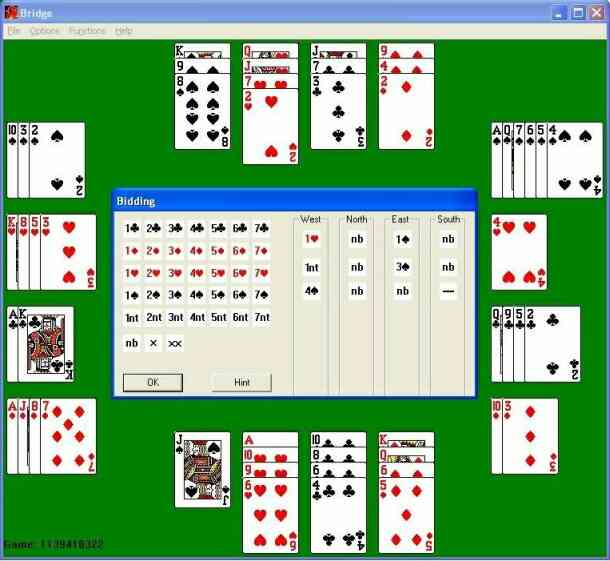
The game in training mode
Version Information
- 1.2a The Card Play Options Dialog did not appear (it caused a crash). The Card Play Options allows you to set auto-play (the computer plays your card as well if you have no choice which card), single click bid and single click play, as well as to turn on the display of the last trick played.
- 1.2b The previous version was linked with dynamic libraries for MFC and so does
not run if you don't have those libraries installed. 1.2b is now statically linked
so that it runs as a stand-alone program.
A bug in calculating the scores of undertricks when vulnerable has been fixed.
Search the site
